The Photoshop alternative · 2026
A Photoshop alternative
that's actually yours.
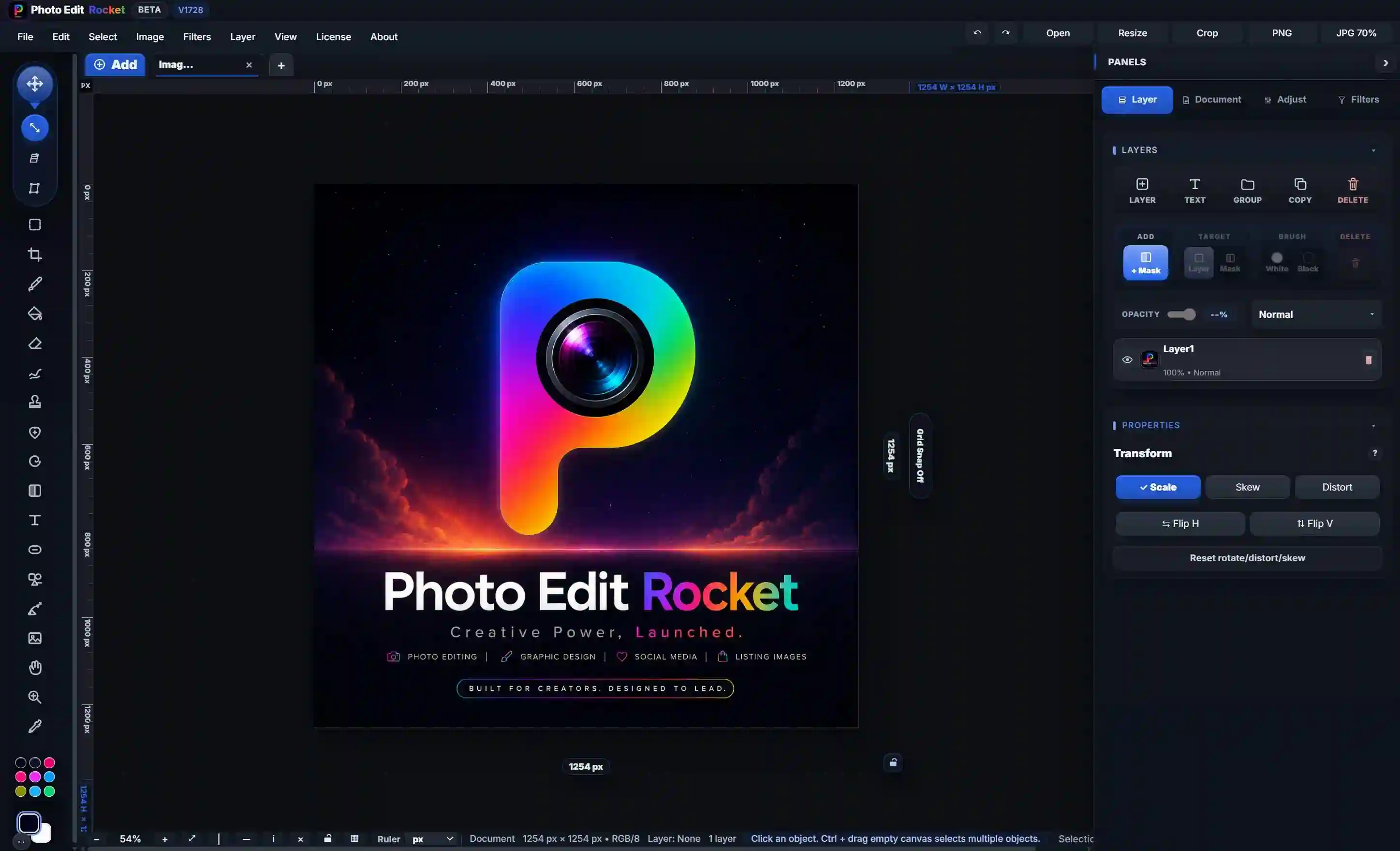
PhotoEditRocket is a no-subscription Photoshop alternative with real layers, masks and PSD import — running right in your browser and as a native app on Windows, Mac and Linux. Free to try; buy it once for $19.99 to own. No monthly fees, no cloud upload, no catch.
Why switch
Why people look for a Photoshop alternative
The most common reasons designers, photographers and creators search for an alternative to Adobe Photoshop — and how a one-time, local-first editor answers each one.
No subscription, ever
Tired of paying monthly forever? This Photoshop alternative is a single $19.99 payment for a lifetime license. No recurring charges, no auto-renew, no "your plan expired" lockouts.
Free to start
The free browser demo is the full editor. Use it as a free-to-try Photoshop alternative online — no signup, no download, no credit card.
Your files stay yours
An offline Photoshop alternative: editing runs locally and your images never upload to the cloud.
Works everywhere
A Photoshop alternative for Windows, Mac and Linux — plus the browser. Same editor on every device.
Opens your PSDs
Open PSD files without Photoshop. Import layers, groups and masks so you can keep working with files you already have.
Side by side
PhotoEditRocket vs. Photoshop & subscription editors
An honest comparison of an affordable Photoshop alternative against a typical subscription photo editor and a browser-only template tool.
The table below reflects our understanding based on publicly available information and last reviewed in June 2026 — it may be out of date. It is our opinion offered for general comparison — please verify current features and pricing on each product’s official website.
| Feature | PhotoEditRocket | Subscription pro editor | Browser template tool |
|---|---|---|---|
| Price | $19.99 once | ~$22/mo (varies) | ~$15/mo (varies) |
| No subscription | ✓ | ✗ | ✗ |
| Real layers & blend modes | ✓ | ✓ | Limited |
| Layer & vector masks | ✓ | ✓ | Limited |
| Open / import PSD | ✓ (most layers) | ✓ | ✗ |
| Works in the browser | ✓ | Partly | ✓ |
| Windows, Mac & Linux app | ✓ | Win/Mac | ✗ |
| Works offline | ✓ | Partly | ✗ |
| Photos stay on your device | ✓ | Cloud-tied | Cloud-tied |
| Free full-feature demo | ✓ | Trial only | Watermarked |
Comparison is for general guidance; competitor pricing and features change often, so check current details before deciding. PSD disclaimer: PSD import is never 100% — expect up to about 99% close to the original PSD, never an exact match; only rasterized layers are guaranteed to look close, so always test your file in the free demo. See the full comparison →
Made for your work
A Photoshop alternative for every job
Whether you need a free-to-try Photoshop alternative for photo editing, a PSD editor, or a desktop image editor without a subscription, PhotoEditRocket covers the everyday workflow.
Photographers
Retouch, mask, dodge & burn, and color-grade with non-destructive layers.
Graphic designers
A layered design editor with type, vector shapes and templates — a practical Photoshop alternative for design.
Social & content creators
Thumbnails, posts, banners and ads, sized and exported fast.
Product sellers
Clean listing images, EBC graphics and store images without a monthly bill.
Students & hobbyists
An affordable, free-to-try Photoshop alternative to learn real layer-based editing.
PSD support
Open PSD files without Photoshop
Already have Photoshop files? Import .psd documents with layers, groups and masks and keep editing. PSD import is never 100% (expect up to about 99% close to the original PSD, never an exact match) — rasterized layers reproduce most closely — some advanced effects may render differently, so test your specific file free in the browser before buying. See PSD import details →
Try the Photoshop alternative free.
No signup, no download, no subscription. The free browser demo is the full editor — if it fits your workflow, $19.99 unlocks clean exports and the native Windows, Mac & Linux app for life.
FAQ
Photoshop alternative — frequently asked questions
Is there a free-to-try Photoshop alternative?
Yes. PhotoEditRocket runs free in your browser with the full editor — real layers, masks, type and PSD import. A one-time $19.99 license unlocks clean exports and the native desktop app, with no subscription.
Can I open PSD files without Photoshop?
Yes. It imports .psd files with layers, groups and masks. PSD import is never 100% (expect up to about 99% close to the original PSD, never an exact match) — rasterized layers reproduce most closely; some advanced effects may render differently, so test your specific file free in the browser before buying.
Is it a good Photoshop alternative for Windows, Mac and Linux?
Yes. It works in any modern browser and ships as a native desktop app for Windows, macOS and Linux — the same editor on every platform.
Does it cost a monthly subscription?
No. It's a one-time payment of $19.99 for a lifetime license — no monthly fees and no auto-renewal.
Do my photos get uploaded to the cloud?
No. All editing happens locally in your browser or desktop app, so your images never leave your device.
Is this the best Photoshop alternative in 2026?
It depends on your needs — but if you want real layers and masks, PSD import, offline editing and no subscription, PhotoEditRocket is a strong, affordable pick. Try the full editor free and decide for yourself.
Comparison disclaimer: The comparisons on this page are based on publicly available information and our own understanding at the time of writing, and are provided for general guidance only. Competitor products, pricing and features change frequently — please verify current details on each company’s official website. PhotoEditRocket is an independent product and is not affiliated with, endorsed by, or sponsored by any of the companies or products mentioned. All product names, logos and trademarks are the property of their respective owners and are referenced here for identification and comparison purposes only (nominative fair use).